Orkut Sharing

Friday, June 5, 2009

Google Launched Orkut Mobile App

If you all remember I had written a post few months back Google Is All Set To Release Orkut App for Mobile Phones yesterday was the day when Google launched beta Orkut mobile application which you all can download on all Java-enabled phones which includes some of the popular phones like Nokia N95, Nokia 6300 and Sony Ericsson W580i.

Top five favorite features of Orkut mobile app:

  • Upload photos to orkut on-the-go, directly from your phone.
  • View scraps, friends' updates, and photo albums while you're offline.
  • Share your orkut albums with all of your friends whether they use orkut or not (via SMS).
  • Easily call or SMS your orkut friends and address book contacts from within the app.
  • Get automatic updates when your friends change their contact information or orkut profiles.

Steps to download:

  1. Go to m.google.com/orkut from your mobile phone’s browser.
  2. It will ask you to “Install” the application which is 495 KB.
    orkut_install orkut_kb
  3. After it gets installed you have to go to the application ( In Nokia phones it will be in the application folder) and select it.
    orkut_app
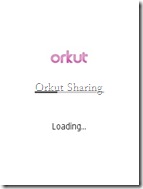
  4. Then Orkut app will start loading.
    orkut_loading
  5. Once its loading is completed you will have to sign-in with your Orkut account. That’s all.
    orkut_signup

Few snap-shots of Orkut mobile app:

Home Page

orkut_home

My Scrapbook

orkut_scrapbook

My Contacts

orkut_contact

My Photos

orkut_photos

My Profile

orkut_profile

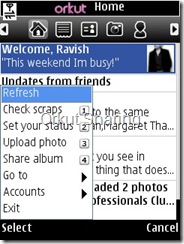
Option Menu

orkut_menu

What’s the cost?

Google has made this application free to download, however data plan of GPRS charges will be applicable so you have to check it with your phone provider. I have to check my bill . Do share your experience with us by leaving comments and keep orkutting.!

[Link: Orkut Blog]

Labels: ,

Wednesday, May 20, 2009

Google Sync Beta – Now for Nokia S60

nokia_smart_large This a great news for all those who have Nokia S60 Smartphone, now you can synchronize your Google Contacts and Calendars with your mobile phone. Google just announced this news which is welcomed by many users.

s60_blog

You can make changes from desktop Google account or your mobile phone as well. The changes will automatically get updated within few minutes. This feature is also available for  iPhone and Windows Mobile.

Key Features:

  1. Synchronize your contacts.
  2. Get calendar alerts.
  3. Always in sync.

Advantages:

  1. If you lose your phone  then contacts and information in your calendar are not lost with it.
  2. Get all the updates of your upcoming appointments on your mobile phone with sound or vibration.
  3. No third party tool needed, as Google Sync for S60 requires Nokia’s Mail for Exchange to be installed on the phone

Once you have installed the required software then follow  Google Sync: Setup Instructions to complete the setup and enjoy this new feature.


Google Sync for Mobile:


NOTE: Take a backup of your important data because Google says

Important! Google Sync uses the Microsoft© Exchange ActiveSync© protocol. When setting up a new Exchange ActiveSync account on your Nokia, existing Contacts and Calendar events may be removed from your phone. Please make sure to back up any important data before you set up Google Sync.

To try Google Sync, visit m.google.com/sync from your desktop and let us know was this new feature helpful and do share your expiries by leaving comments below.

[via: Official Google Mobile]

Labels: ,